
Move Your WordPress Site to HonestHosting
Keep your domain. Keep your email. No downtime before the DNS cutover — here's what actually moves and how the migration works.
You can move a WordPress site to a new host without transferring your domain, without changing your email provider, and without taking your live site offline while the copy runs. Your current site keeps serving visitors right up until you change DNS, and if you prepare that cutover properly, nobody sees an error page.
That's the answer to the question most people are actually asking. The rest of this page explains why it's true, and the guides below walk through it host by host.
What actually moves — and what stays put
Almost all migration anxiety comes from one misconception: that "my website" is a single thing living in a single place. It isn't. There are four separate services, they can live at four different companies, and moving one doesn't require moving the others.
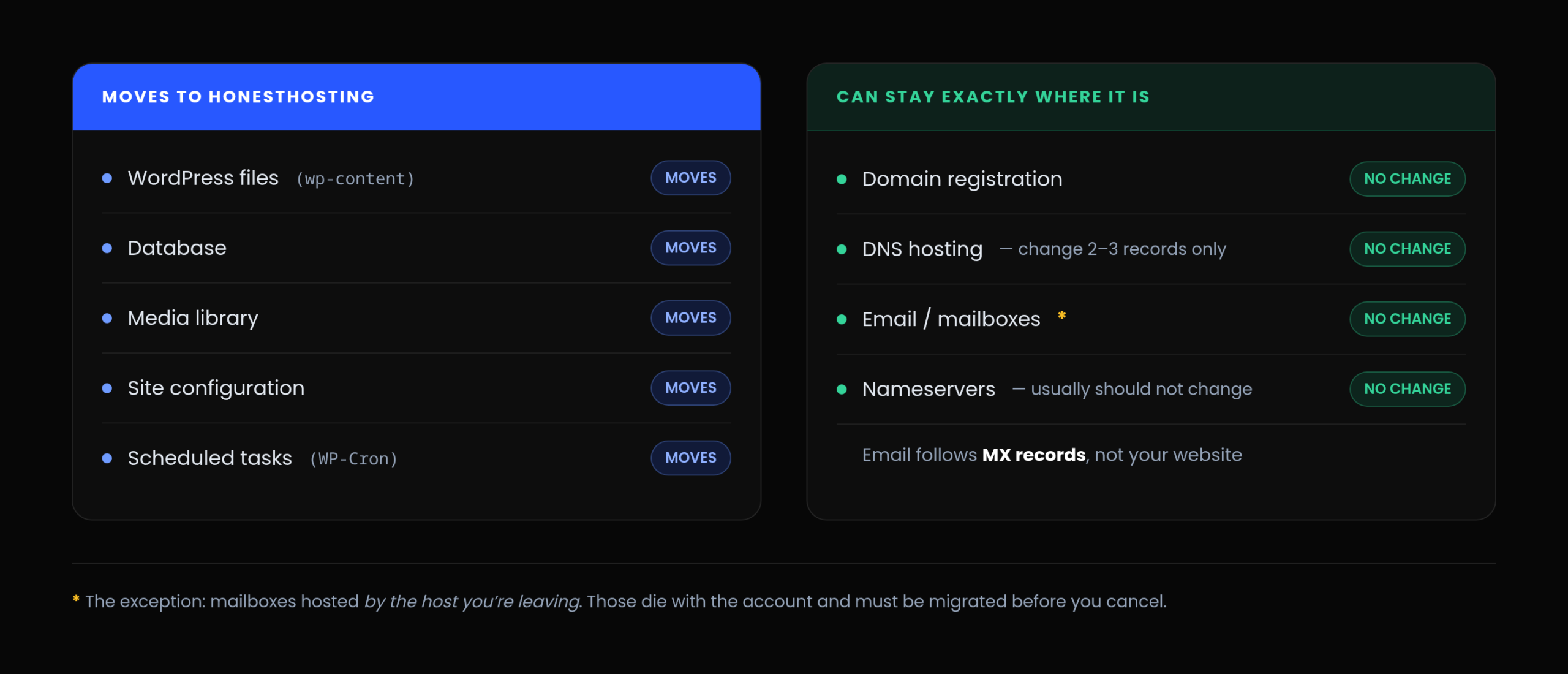
Hosting — this is the only thing that moves
The server running WordPress: PHP, the database, your files.
Domain registration — leave it where it is
Your ownership of the name, held at a registrar. If you want to transfer it later, do that as its own task, once the website is settled. Combining the two changes is how simple migrations turn into complicated ones.
DNS hosting — leave the zone alone
The records telling the internet where to find things: the website (A/AAAA/CNAME), where email goes (MX), and what's allowed to send mail as you (TXT/SPF/DKIM/DMARC). You can leave the entire zone where it is and change only the two or three records that point at the web server.
Email follows MX records, not your website
Move the site, leave MX alone, and your mail keeps working. The exception is if your mailboxes are hosted by the host you're leaving — common with shared hosting that bundles email. Those mailboxes don't move with the website and they die with the account, so they need migrating first, before you cancel anything.
If your email is on Google Workspace, Microsoft 365, Fastmail, or anything else external, you're in the easy case: don't touch MX and nothing happens at all.
Migration guides by provider
Each guide is a full walkthrough — pre-migration checklist, the transfer itself, provider-specific cleanup, the DNS cutover, post-migration verification, and when it's safe to cancel.
Away From SiteGround →
Includes SiteGround-specific cleanup (Speed Optimizer and its object-cache drop-in, Security Optimizer, .htaccess rules that won't carry over) and the mailbox problem, which is the one part of a SiteGround migration that genuinely needs planning.
Away From GoDaddy →
Includes removing GoDaddy's gd-system-plugin must-use plugin and object cache drop-in — which can't be deactivated from wp-admin — plus how to cancel hosting without disturbing your domain, your DNS zone, or your Microsoft 365 subscription.
Migrating from a host without a guide
The guides above are provider-specific, but the process is the same everywhere. If you're coming from somewhere I haven't written about yet, this is the shape of it — and the Site Migrator works the same regardless of where you're leaving.
- Inventory first. WordPress and PHP versions,
wp-contentsize, database size, plugin list, and — most importantly — a full export of your DNS zone, including MX and every TXT record. - Create the destination site with the Import toggle enabled, matching the source WordPress and PHP versions. Migrate first, upgrade second; two changes at once means you can't tell which one broke something.
- Install the Site Migrator on the source site and validate your import key.
- Run preflight checks. They compare source and destination and tell you whether the migration will work before you commit to it. Errors block; warnings usually don't.
- Run the migration. Your live site stays up throughout — the export is a read operation.
- Preview and validate the copy before touching DNS.
- Clean up anything host-specific the old platform left behind.
- Lower your DNS TTL, 24–48 hours ahead.
- Run a final incremental sync, then change the web records only.
- Verify production, including sending and receiving email.
- Wait a week or two, then cancel the old host.
The HonestHosting Site Migrator
The migration itself runs on a free WordPress plugin you install on the site you're moving. It's on WordPress.org, and it's built for the environment it has to work in: shared hosting with tight PHP limits and no shell access.
Preflight validation
Before anything transfers, it inspects both ends — file count and size, database size and storage engines, PHP version, memory limit, max execution time, available extensions, and whether the destination has capacity — and tells you what will and won't work. You find out about problems before you commit, not halfway through.
Chunked and resumable
Files and database are streamed out in compressed chunks of 5–20 MB, with every completed chunk checkpointed. If PHP times out, the page reloads, or the connection drops, you click Resume and it continues from the last checkpoint instead of starting over. On a host with a 30-second execution limit, that's not a convenience — it's the only way a multi-gigabyte export finishes at all.
Direct to storage
Chunks upload straight from your source site to object storage using short-lived, single-use presigned URLs. Nothing large is proxied through our API, so there's no intermediary bottleneck and no size ceiling.
Full, incremental, and scheduled
After a full copy, incremental runs move only what changed — files, database tables, or both. You can copy everything days ahead and top it up with just the changes immediately before cutover, which is what makes a busy store migratable without a maintenance window. Scheduled incremental sync via WP-Cron is available at 1, 4, 12, or 24 hour intervals.
No shell access, no external binaries
Pure PHP, WordPress 6.7+, running on PHP 7.4 through 8.5. PHP 7.4 is supported specifically so a legacy site can move off a legacy runtime without upgrading first.
Your URLs don't change
The migrator deliberately doesn't rewrite siteurl or home. Your site arrives already configured for the domain it's about to serve, so there's no search-and-replace, no mixed-content scramble, and nothing for Google to reconcile.
The Site Migrator moves sites from small shared-hosting installs up to sites over 10 GB across roughly 90,000 files. Export and restore typically take 2–5 minutes each for a small site, and up to about 30 minutes each for a large one.
Why there's no downtime
The whole method rests on one principle: never break what's working until the replacement is proven.
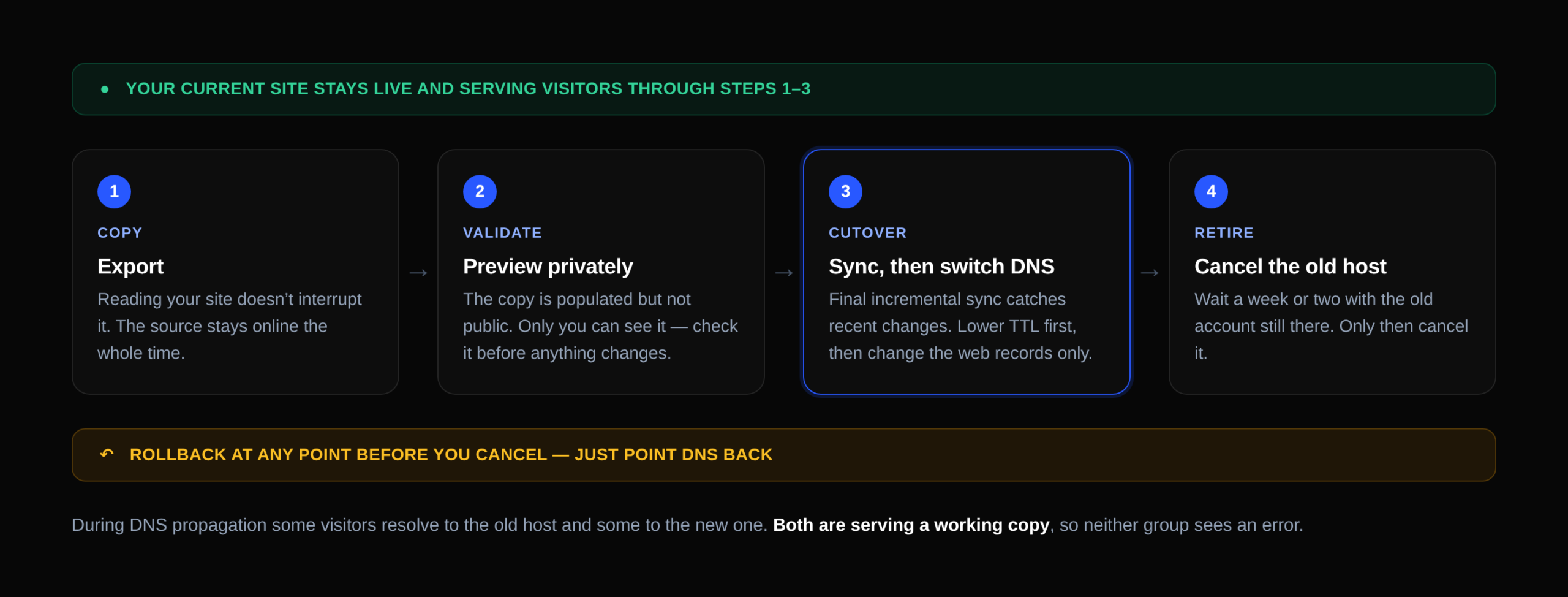
The live site never goes down, because copying it is a read operation. During DNS propagation, some visitors resolve to the old host and some to the new one — and both are serving a working copy, so neither group sees an error. Rollback at any point before you cancel is simply: point DNS back.
For dynamic sites — stores, membership sites — the one genuinely tricky part is data written to the old site after the export. A final incremental sync plus a short cutover window handles most of it. For a store doing real order volume, a ten-minute maintenance window during the switch is a legitimate choice and beats a lost order.
Common questions
Will my website go offline during the migration?
No. The copy is a read operation on your existing site, which stays live and serving visitors the whole time. Only the DNS cutover changes anything for visitors, and both copies serve correctly during propagation.
Do I have to move my domain?
No. Domain registration, DNS hosting, and web hosting are three separate services. Leave the domain registered where it is and change only the DNS records that point at the web server.
Will my email stop working?
Not if you leave your MX records alone — email follows MX, not your website. The exception is mailboxes hosted by the provider you're leaving; those need migrating before you cancel.
Do I need to change nameservers?
No, and usually you shouldn't. Changing nameservers replaces your entire DNS zone, which is the most common way people accidentally break their email. Leave DNS where it is, use Custom DNS on the site, and change two or three records.
Can I keep Cloudflare?
Yes, and it makes the cutover easier. Nameservers stay at Cloudflare, MX and TXT stay untouched, and you change the origin your proxied records point at.
Will migrating hurt my SEO?
It shouldn't. Your URLs don't change, your content doesn't change, and the site doesn't go offline. Keep the same domain and permalink structure and watch Search Console for a couple of weeks afterwards.
What happens to my SSL certificate?
You get a new one, free and auto-renewed, issued for your domain once it resolves to the new host. You don't move the old certificate.
How long does it take?
The transfer is usually 2–5 minutes each way for a small site, up to about 30 minutes each way for a large one. Preparation and testing take longer than the transfer does — budget an afternoon for a straightforward site.
What if it fails halfway?
Click Resume; it continues from the last checkpoint. If it keeps failing, the plugin generates a debug bundle (with your import key redacted) you can send us. Your live site is unaffected either way.
Can you migrate my site for me?
Yes. The tooling is self-service by design, but if you'd rather we ran it — or you have a store and want a second pair of eyes on the cutover — get in touch.
Request migration assistance
The tooling is self-service by design and most sites move without help. But if you'd rather we ran it — or you have a store and want a second pair of eyes on the cutover — tell us about your site below.
Just send the URL. You don't need to know your PHP version, database size, or plugin list — we work that out from the site itself.
Start your migration
Create a site with the Import toggle enabled, install the Site Migrator on your existing site, and run the preflight checks. Within a few minutes you'll know whether your site will move cleanly — before you've committed to anything, and without touching your domain or your email.
Still deciding whether to move? Read the hosting comparisons →