
Managed WordPress Hosting
Managed WordPress Hosting for Agencies, Resellers, and businesses — we handle the technical heavy lifting so you can build, grow, and scale with confidence.

I built HonestHosting because I got tired of the same three conversations.
The first is the renewal conversation, where the price you signed up at turns out to have been the price for year one only. The second is the noisy-neighbour conversation, where a site slows down and nobody can tell you which of the two hundred accounts on that machine caused it. The third is the plugin conversation, where you find out what you're allowed to install after you've already built around something else.
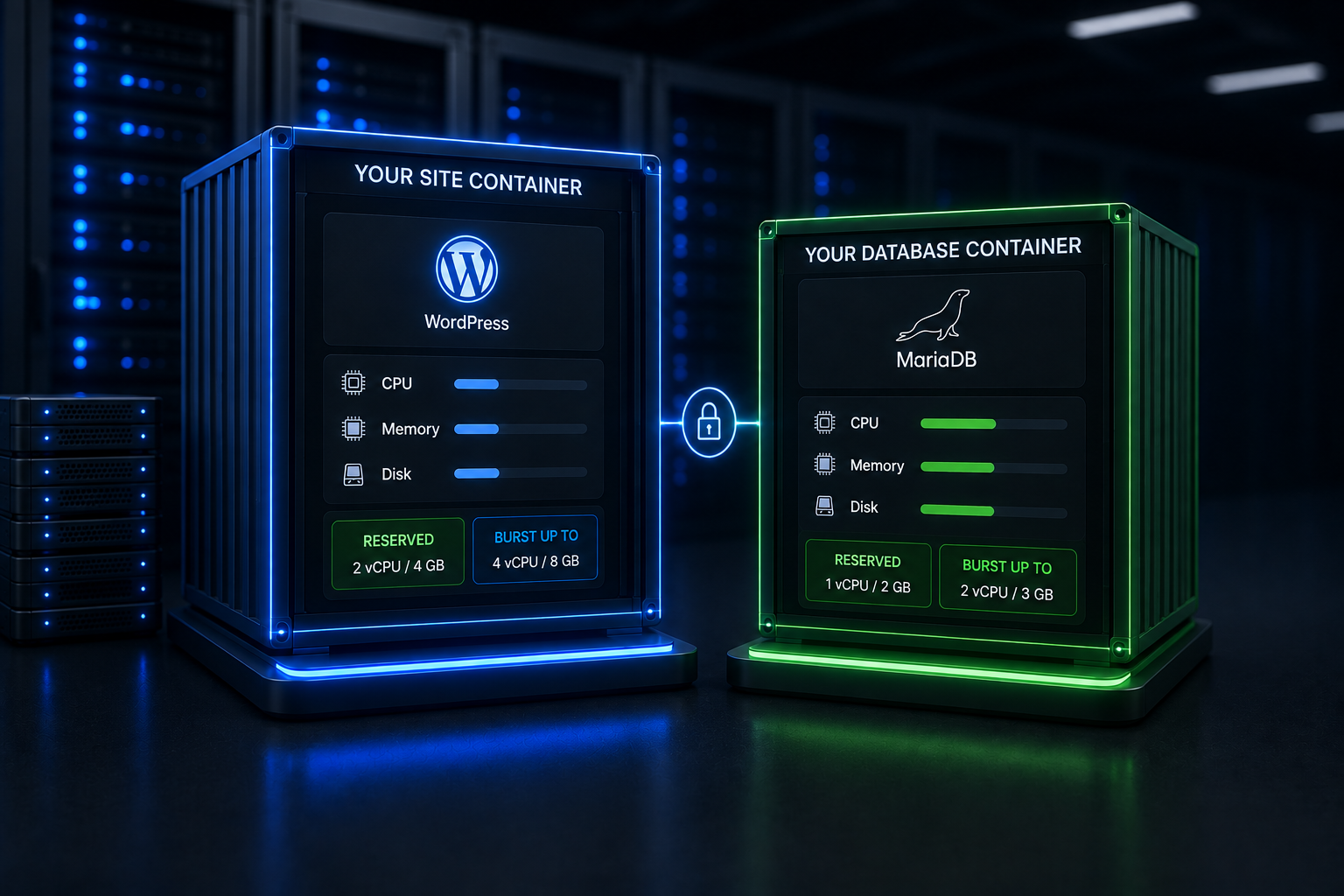
So HonestHosting works differently. Every WordPress site here runs in its own container with a reserved slice of CPU and memory, and it gets its own database container next to it. You pay per site, per month, for what you actually used. No introductory rate, no renewal rate, no contract, and no list of plugins you're not allowed to run.
This page explains how the platform works and who it's for. If you already know and you're weighing us against someone specific, go to WordPress hosting comparisons. If you've decided and you want to move a site, go to migrate to HonestHosting.
Your own container.
Your own database.
Most WordPress hosting divides a machine by policy. Your account shares CPU, memory, and disk with everyone else's, and a fair-use document explains what happens when someone takes more than their share. It works — right up until it doesn't, and then the fix is a plan upgrade.
We divide by reservation instead. When you create a site, the platform schedules two containers for it: the WordPress site itself, and a MariaDB database that belongs to that site alone. Both get a CPU and memory allocation that's held for them whether or not they're using it, plus a ceiling they can burst up to when the host has headroom.
Blast radius is one site
The protection runs both ways. If another customer's site is compromised or buried in traffic, it burns its own reserved CPU and memory and stops at its own ceiling — your sites never feel it. When it's one of your clients having the bad day, the same wall holds in reverse: it's contained at the source, so nobody gets throttled to protect the neighbours.
No blanket blocklists
Some managed platforms maintain plugin blocklists, and there's a real engineering rationale behind them when everyone shares a machine. We don't need one — your container is yours. If something turns out to be actively malicious we'll act on it, because that's a security response. What we won't do is ban a plugin because supporting it is inconvenient.
Your database isn't in a queue
Uncached traffic — logged-in users, cart and checkout, admin, REST API calls, search — hits PHP and the database on every request. Those are the requests where a dedicated database process stops being an architectural nicety and starts being the reason your checkout still responds at 4pm on a Friday.
Priced per site, per month
Sites are priced per site, per month, by tier, and a tier is simply a specific reserved CPU and memory allocation — for the site container and for its database. Storage, CDN, managed DNS, and managed email are separate line items billed on what you actually use. Domains aren't listed at all: registration, renewal, and transfer prices are quoted live from the registrar when you search, because they vary considerably by TLD and premium names vary far more.
Rather than reprint a price list here that goes stale the moment anything changes, current tiers and rates live in one place and stay current. You can change a site's tier whenever you like. Edit the site, pick the new tier, save, and the platform redeploys with the new allocation. There's no re-platforming and no sales call.
How billing actually works
You're billed monthly, in arrears. On the 2nd of each month your card is charged for the services you used the previous month. There's no introductory rate, so there's nothing to renew into, and there's no contract to exit.
That's the whole model. It's also where the company name came from.
Built to stay fast when the cache misses
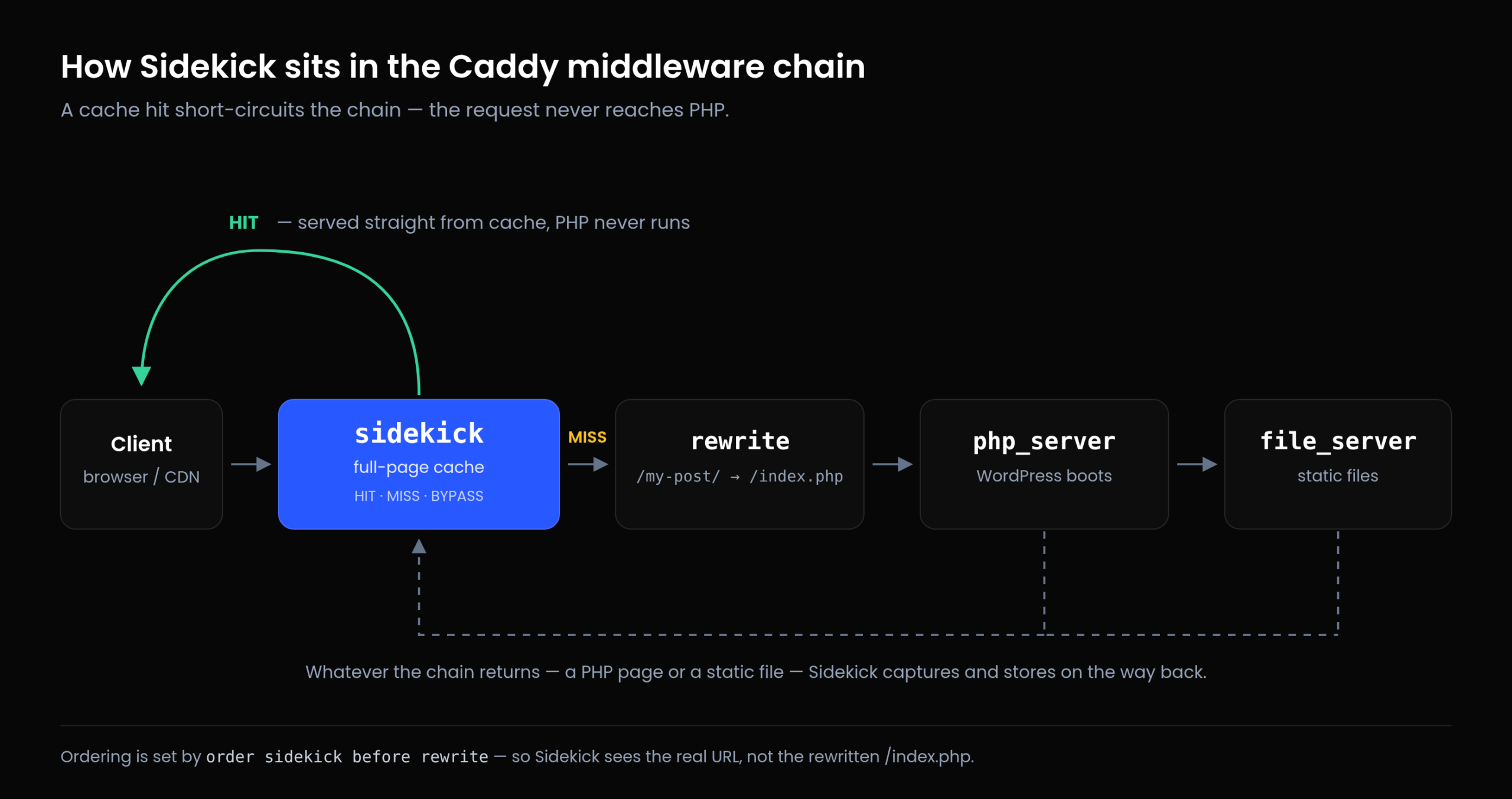
Cached pages are served by Sidekick, a caching module we co-opted for Caddy and open-sourced. It keeps compressed variants (gzip, brotli, zstd), streams large responses to disk rather than buffering them in memory, handles conditional requests with ETag and Last-Modified, and installs its own must-use plugin into WordPress so purges happen when content changes.
Behind it, PHP runs on FrankenPHP in worker mode, and that matters more than it sounds. In a traditional PHP-FPM setup WordPress boots from scratch on every single request — load core, read config, connect to the database, initialise every active plugin — and then throws all of it away. In worker mode the application is booted once and kept resident in memory, so a request arrives at an already-warm WordPress rather than building one first. Because Caddy, Sidekick, and FrankenPHP are all part of the same server, a request also gets from the edge to PHP without leaving the process.
The worker pool is sized from your tier's memory allocation and scales with demand: it starts at a thread count derived from the memory reserved for your site, and scales up to a ceiling derived from that tier's burst headroom. In practice, a traffic spike gets more concurrent PHP workers automatically — up to the limit you're paying for — instead of queueing behind a fixed pool. The entry tier has no burst headroom by design, so its worker pool is fixed; autoscaling starts once a tier has room above its reservation.
Alongside that: OPcache enabled by default, and a Redis object and page cache you toggle per site.
In front of it, optionally, a global CDN, with a 1-hour default TTL and compression on. It never caches /wp-admin/*, /wp-json/*, wp-login.php, wp-cron.php, or xmlrpc.php — the paths where caching causes more problems than it solves. You can invalidate the whole cache or specific paths from the dashboard whenever you need to.
I'm not going to publish a "we're X% faster" number. I don't have a benchmark that would survive scrutiny, and neither does anyone else publishing those figures with an affiliate link underneath. What I'll say is what's architecturally true: for cached traffic, most decent hosts are serving bytes from a cache and the difference is mostly geography. For uncached traffic, a reserved allocation and a dedicated database behave more predictably under load than a shared pool.
Security and backups
- Isolation first. Container per site, database per site, no shared filesystems or process space between customers.
- A web application firewall with malware defense in front of sites, enabled by default for all sites.
- Free TLS certificates, issued and auto-renewed, for every site. Domains managed on the platform get certificate validation handled for you.
- Daily backups of files and database, per-site toggle, written to object storage, with long-term archives kept separately. Restoring creates a *new* site from the backup, so you can verify the restored copy before cutting anything over — you never destroy the broken state you're recovering from.
- Access closed by default. FileManager (web + SFTP) and phpMyAdmin are per-site toggles, off unless you turn them on.
- Update policy per site. Theme and plugin auto-updates on by default, minor and dev core updates on by default, major core updates off by default. An agency can run conservative policy on a fragile client site and aggressive policy on its own.
Built for people who manage other people's sites
Most of what's distinctive here exists because the platform was built for resellers and agencies rather than for a single site owner.
Properties group sites, domains, and email by client, so a portfolio of thirty sites is organised the way you actually think about it.
A public REST API with a Swagger reference and personal access tokens. Sites, domains, DNS records, email, billing, and imports are all API objects. If you provision sites in volume, that's a script rather than an afternoon of clicking.
Client billing in the platform. Define Products and Prices, issue Payment Requests, and get paid through Stripe. For a reseller, that removes a whole tool from the stack. How getting paid works →
DNS built for resellers. Managed DNS with vanity nameservers and glue records supported, so your clients' domains can use your nameservers. Or keep DNS wherever it already lives and use Custom DNS.
An opt-in MCP server on every site. It requires WordPress 6.8.0 or newer — on anything older it isn't available at all — and on supported versions it is disabled by default and enabled by a site administrator. AI access to a client's site should be a decision somebody makes deliberately, not a default they discover afterwards.
Once enabled, it gives Cooper — our assistant — a defined capability surface to work through, instead of screen-scraping wp-admin. Three things about how that's built are worth knowing:
- No API keys are ever injected into WordPress. The site never holds an LLM credential. Approaches that store provider keys in the database turn every WordPress install into somewhere a key can leak from; this design avoids that problem rather than managing it.
- Capabilities are discovered from the site, not hardcoded. Cooper reads that site's own
abilities-apiregistrations, so a plugin that registers abilities becomes usable immediately, and two of your sites can legitimately offer different capabilities. - Long conversations are compacted, not truncated. As a conversation fills its context window, earlier turns are condensed into a summary while recent messages stay intact — automatically, or on demand — and compaction is marked in the transcript so you always know when it happened.
Cooper works at the platform level too: create a site, restart a site, check billing. Anything that changes something pauses for your approval first, and approvals, declines, and outcomes are all recorded. It bills in AI Credits, a provider-agnostic unit, available as a subscription or a one-time pack. How Cooper works →
Maintenance subscriptions, if you'd rather hand the upkeep to us. Basic Care, Standard Care, and Premium Care cover core, plugin, and theme updates applied and verified, backup verification, and uptime monitoring — with Premium adding malware scanning and removal, weekly rather than monthly update cycles, DNS management, and same-business-day response. Current tiers and rates →
What we don't do
I'd rather you found this out here than three weeks in.
Two of the gaps below — shell access and staging — are things we're building properly rather than approximating. We could claim both today and hand you a stack of workarounds with a feature name printed on it. That's a bill of goods, and it's the opposite of how I want this company to operate: we'd rather be straight with you about a gap and then do the work to close it well, in the way that actually fits this platform, than tick a comparison-table box with something held together by tape.
Both are planned. If either is a hard requirement for you today, get in touch and ask about early access — the people who tell us what they need are the people who shape what gets built, and they're first through the door when it lands.
No SSH or WP-CLI (yet!)
Today you get FileManager over web and SFTP, plus phpMyAdmin — both per-site toggles. If your workflow is "SSH in and run WP-CLI," that's a real gap and I'm not going to talk you out of it.
It's on the roadmap. The design question we're working through is what command-line access should actually look like on a platform where sites are containers rather than persistent shell accounts — and whether what people need is a shell at all, or WP-CLI with the operations, scoping, and audit trail that make it safe to run against a client's live site. We'd rather answer that properly than ship a half-measure and call it CLI access.
If this is blocking you, tell us which commands you'd be running. That genuinely shapes the design, and it's how you get on the early-access list.
No one-click staging (yet!)
Not in the form the rest of the industry means it — clone the site, test against the clone, push the result back to production.
Some customers do stand up a test copy by restoring a backup into a second site, and that works fine. But it's a workaround: it's an ordinary billable site, there's no push-to-production, and I'm not going to put "staging" on the feature list on the strength of it.
Real staging is planned. Doing it well means handling the parts people actually get bitten by — a clone Google can't index, that can't email your real customers, and that won't fire scheduled jobs at your live payment processor — rather than shipping a copy button and declaring victory. If staging is a hard requirement, request early access.
No round-the-clock call centre
Support that knows you and the platform. Support isn't a separate department here. When you get in touch you're talking to the people who build and operate the platform — nobody has to escalate a question about how the caching layer behaves, because the person who wrote it is reading your message, and you aren't re-explaining your setup to a new name every time.
The honest trade is that we're not a follow-the-sun call centre, and I'd rather you knew that before you needed us than after. If round-the-clock phone support is a hard requirement, larger hosts have an answer for it. Get in touch →
No bundled email or free domains
Managed email here is a real Google Workspace seat with actual storage — a heavier and more capable thing than a shared-hosting mailbox, and priced accordingly. If all you want is a mailbox, hosts that bundle one into the hosting price will be cheaper.
Not the cheapest way to host ten small sites
Per-site pricing can't compete with an unlimited-sites shared plan for low-traffic brochure sites, and I won't pretend otherwise.
That being said, we are always willing to work with our customers–it never hurts to drop us a line and explain your situation–we will do our best to work something out that is beneficial to all.
Moving an existing site
You can move a WordPress site here without transferring your domain, without changing your email provider, and without taking the live site offline. Your current site keeps serving visitors until you change DNS.
The HonestHosting Site Migrator is a free WordPress plugin you install on the site you're moving. It runs preflight checks against both ends, then streams your wp-content and database to us in compressed, resumable chunks that upload directly to object storage — no shell access required, which is why it works on shared hosting with tight PHP limits. It supports full, incremental, and scheduled sync, so you can copy everything days ahead and top it up with just the changes right before cutover.
Comparing us against someone specific
I write comparison articles for the hosts people actually ask me about, and I write them with a rule: say clearly where the competitor is the better choice. There are always rows we lose, and pretending otherwise would cost more credibility than winning the row is worth.
Common questions
Who is HonestHosting for?
Agencies, resellers, freelancers managing client sites, and businesses running one or two sites that genuinely matter. The common thread is wanting predictable, isolated resources rather than the lowest possible price per site.
Can I host multiple client sites?
Yes — that's the primary use case. Group them with Properties, provision them through the API, and bill your clients through the platform.
Do you restrict which plugins I can install?
No blanket blocklist. We reserve the right to act on a plugin that's actively malicious — that's a security response, not a policy — but we don't ban plugins for being awkward to support. One caveat worth knowing: page caching is handled at the server by Sidekick and object caching is the Redis toggle, so a page-cache plugin on top usually causes problems rather than solving them.
What happens if my site outgrows its tier?
Change the tier and save. The platform redeploys with the new allocation.
Where are the servers?
You choose a datacenter when you create a site, currently located in the us-west region.
Do you offer a free trial?
Yes, we offer free-trial accounts for new users. You can create a site and test the platform without any upfront payment. The trial period allows you to explore the features and performance of HonestHosting before committing to a paid plan. The system does auto-billing at the next monthly billing cycle, so you can cancel before the end of the month to avoid charges.
If that's not enough, you can also contact us to discuss a custom trial or demo tailored to your specific needs.
Get started
Create a site, put something real on it, and see how it behaves. There's no contract and no introductory rate to time — you're billed monthly for what you used.
Already have a site somewhere else? Start a migration →