
SiteGround vs HonestHosting:
Which WordPress Host Is Right for You?
Both platforms are built specifically for WordPress. The real difference is a tuned shared platform versus dedicated per-site resources — including where SiteGround is the better answer.
I run HonestHosting, so treat this the way you'd treat any comparison written by one of the two parties: read the citations, not the adjectives.
A tuned shared platform, or dedicated resources
People usually choose SiteGround deliberately. It has spent years as one of the hosts WordPress users recommend to each other, it is listed on the WordPress.org hosting page, and its support has a genuinely good reputation. That is a different starting point from a host you end up on by accident, and it means the honest comparison is not about competence — SiteGround knows how to run WordPress. It is about what a tuned shared platform can and cannot promise you.
HonestHosting covers the same ground — domains, DNS, mailboxes, and a CDN are all here — but prices each as a real service rather than a line on a bundle. Every site gets its own container with a reserved slice of CPU and memory, and its own database container next to it. You pay per site, per month, in arrears, for what you actually used. What we do not have is a website builder or a phone room.
So the comparison is not about which platform understands WordPress — both do. It is a tuned shared platform versus dedicated resources. SiteGround gets a great deal out of shared infrastructure through its own caching stack and a control panel it wrote itself, at an introductory price that rises sharply on renewal. I sell dedicated CPU and memory per site at one rate that does not move, with an API to drive it.
Which one, quickly
Choose SiteGround if…
- SiteGround is a mature, WordPress-focused managed host, listed on the WordPress.org recommended hosting page and widely recommended by WordPress users themselves. That reputation is earned, and it is a perfectly good reason to pick a host.
- You want the lowest entry price — the introductory rate on a first term is very competitive, provided you go in knowing it rises substantially at renewal.
- You want 24/7 support with a strong track record. SiteGround support is consistently well reviewed, across chat and tickets, at a scale I simply do not have.
- You want a WordPress caching stack maintained for you — SG Optimizer plus their SuperCacher layers, tuned by the people who run the servers.
- You want one-click staging and Git in the panel — staging on the middle and top tiers, Git on the top tier.
Choose HonestHosting if…
- You want to run whatever plugins you want. SiteGround restricts plugins that collide with its own stack — third-party caching plugins in particular, since SG Optimizer owns that job. I do not maintain a blocklist, though I do reserve the right to act on a plugin that is actively harming the platform.
- You want guaranteed CPU and memory per site, and a dedicated database container per site, rather than a shared managed platform.
- You want pricing that does not jump at renewal. This is the single biggest practical difference. SiteGround discounts heavily on a first term and renews at a much higher rate. There is no introductory rate here, so there is nothing to renew into.
- You're a reseller or agency: Properties for grouping client sites, a public REST API for provisioning, and Stripe-backed client billing built into the panel.
- You want SFTP, phpMyAdmin, and platform-level cache control on every tier, rather than staging, Git, and on-demand backups arriving only when you move up a plan.
- You want the same services — domains, DNS, mailboxes, and CDN — priced individually, so you take only what you need and can see what each one costs.
At-a-glance comparison
| SiteGround (StartUp / GrowBig / GoGeek) | HonestHosting | |
|---|---|---|
| Hosting model | Managed shared hosting on Google Cloud, isolated per account | One container per site, plus a separate database container per site |
| Sites per plan | 1 site on StartUp; unlimited sites on GrowBig and GoGeek | Priced per site |
| Resource allocation | Shared server resources per account, metered as CPU and process limits rather than a reserved slice | Reserved CPU and memory per site, with a burst ceiling |
| Storage | Varies by plan, shared across all sites. | Metered per GB, covering files, database, and backups together |
| Plugin restrictions | Restricted plugin list; third-party caching plugins in particular are disallowed because SG Optimizer owns that role, and the list can change | No blocklist — but we reserve the right to remove a plugin that is actively malicious or harming the platform |
| Backups | Daily automatic, roughly 30 copies retained; on-demand backups on the upper tiers | Daily backups (per-site toggle), plus long-term archives in object storage |
| Staging | One-click staging on GrowBig and GoGeek | Not today. Planned as a first-class feature; early access on request |
| CDN | Free and premium CDN tiers, sold separately | Global CDN, per-site add-on |
| Page cache | SuperCacher — NGINX Direct Delivery plus Dynamic Cache, driven by the SG Optimizer plugin | Sidekick, a server-side cache in our Caddy layer (open source) |
| Object cache | Memcached, enabled per site in Site Tools | Redis object + page cache, per-site toggle |
| Security | Free Let's Encrypt SSL, automated core updates, WAF; SiteScanner malware monitoring sold separately | WAF with malware defense, free auto-renewed TLS, per-site isolation, per-site update policy |
| Shell / CLI | SSH and WP-CLI available; SFTP on all plans | Not yet — FileManager (web + SFTP) and phpMyAdmin, per-site toggles. Command-line access is on the roadmap |
| Migration | SiteGround Migrator plugin for inbound moves | HonestHosting Site Migrator — full, incremental, scheduled, resumable |
| Email hosting included and managed in Site Tools | Priced per mailbox (a full Google Workspace seat) | |
| Domains u0026 DNS | Domain registration, DNS, and hosting all in one account, managed in Site Tools | Managed DNS priced per zone; Custom DNS supported; domains quoted live at search |
| Developer / agency tooling | Git on GoGeek; staging on GrowBig and above; SSH and WP-CLI | Public REST API + Swagger + personal access tokens, opt-in per-site MCP server, Cooper AI, Properties, built-in client billing |
| Support | 24/7 chat and tickets, phone on upper tiers | Direct support from platform owners available via Discord, Email, and phone (weekdays) |
| Pricing model | Introductory rate on the first term, then a substantially higher renewal rate | Monthly, in arrears, no contract, no intro rate — see pricing |
SiteGround details here are drafted from public documentation and have NOT yet been re-verified — every unconfirmed claim is marked. SiteGround may change plans and pricing at any time. Current HonestHosting rates are on our pricing page.
Hosting architecture
How SiteGround hosts WordPress
SiteGround runs on Google Cloud, with each account isolated on shared infrastructure. They control the stack end to end: their own control panel in Site Tools rather than cPanel, their own PHP build, their own caching layers in SuperCacher, and their own optimisation plugin installed into WordPress. You get WordPress, and you get a well-tuned box around it. The tuning is real — this is a host that knows WordPress — and so is the box.
The most consequential wall is the restricted plugin list. SiteGround disallows plugins that duplicate or collide with its own stack — third-party caching plugins above all, because SG Optimizer and the SuperCacher layers already own that job, alongside some backup and security plugins that duplicate platform features. The policy is enforced rather than advisory: a disallowed plugin can be deactivated or removed, and the list can be changed at any time (SiteGround KB — restricted plugins).
I want to be fair about why this exists. Most of the restrictions are defensible: caching plugins conflict with SuperCacher and SG Optimizer; backup plugins duplicate the platform backup system and hammer shared disks; database-administration plugins are genuine security exposure on shared infrastructure. On a platform where SiteGround is responsible for the outcome, restricting the things most likely to break it is a rational engineering decision.
The trade you are making is control. If your workflow depends on a specific caching plugin, a specific backup plugin, or a specific stats plugin, you need to check the list before you commit — and accept that the list can grow to include plugins that are perfectly fine today.
SiteGround also installs its own optimisation plugin (sg-cachepress) into WordPress, and turning on Memcached adds an object cache drop-in (wp-content/object-cache.php). They are also the two things you have to strip out if you ever leave.
What SiteGround does not publish, as far as I can find, is a per-plan CPU and memory allocation you could compare directly — resource use is expressed as executions, process limits, storage/inode limits, etc.
How HonestHosting hosts WordPress
Every site is a container with a reserved CPU and memory allocation, scheduled onto our cluster, with its own MariaDB container beside it. Not a shared database server — its own database process with its own reserved resources.
| Tier | Site container | Database container |
|---|---|---|
| Basic | 100 CPU, 512 MB (no burst) | 100 CPU, 512 MB (no burst) |
| Standard | 500 CPU, 1 GB reserved / 2 GB ceiling | 500 CPU, 1 GB reserved / 2 GB ceiling |
| Premium | 2,000 CPU, 4 GB reserved / 8 GB ceiling | 2,000 CPU, 2 GB reserved / 4 GB ceiling |
| Enterprise | 4,000 CPU, 8 GB reserved / 16 GB ceiling | 4,000 CPU, 4 GB reserved / 8 GB ceiling |
The first number in each cell is reserved and held for your site. The second is the ceiling it can burst to when the host has headroom. Current per-tier rates are on the pricing page, which is generated from the live billing catalogue rather than transcribed by hand.
And there is no restricted plugin list. Your site is your container; if you install something that consumes its resources, it consumes its own resources and hits its own ceiling. That's the whole argument for isolation in one sentence — I don't need to restrict what you install, because what you install can't reach anyone else.
One caveat, so it's stated rather than implied: not having a blocklist isn't a promise never to act. If a plugin turns out to be actively malicious, or is harming the platform for other customers, we reserve the right to remove it. That's a response to a specific problem, not a standing list of software you aren't allowed to run — the difference between a security action and a policy.
LiteSpeed Cache is the clearest example of how that plays out. Nothing stops you installing it — but its page cache needs a LiteSpeed web server to function, and we run Caddy with FrankenPHP and Sidekick. The job it exists to do is already being done a layer below WordPress. So we won't put it on a list and we won't uninstall it for you; it will simply sit there doing very little, unless it starts causing problems for the platform.
The flip side, stated plainly: SiteGround restrictions also stop you shooting yourself in the foot. If you install three conflicting caching plugins on a HonestHosting site, nothing stops you, and the result will be exactly as bad as you would expect.
Mechanism, not benchmarks
No benchmark claims here. I don't have a reproducible head-to-head test, and any number I made up would be worth exactly what you paid for it. What I can compare is mechanism.
SiteGround runs platform-level caching through SuperCacher — NGINX Direct Delivery for static files, Dynamic Cache for full pages, and Memcached for objects — driven from the SG Optimizer plugin, on top of their own PHP build and a free CDN for assets. Core updates are managed. In practice a default SiteGround WordPress site is well cached without the owner doing much, and the tuning is genuinely good work.
HonestHosting serves cached pages through Sidekick, a caching module we wrote for Caddy and open-sourced (caddy-sidekick). It keeps compressed variants (gzip, brotli, zstd), streams large responses to disk rather than buffering them in memory, handles conditional requests with ETag and Last-Modified, and deploys a must-use plugin into WordPress so purges happen on content change. Behind it: PHP with OPcache, a per-site Redis object and page cache, and an optional edge CDN with a 1-hour default TTL that never caches /wp-admin/*, /wp-json/*, wp-login.php, wp-cron.php, or xmlrpc.php.
Where the architectural difference actually bites is the same place as always: uncached requests. Logged-in traffic, cart and checkout, admin, REST API calls, search. Those hit PHP and the database every time. A dedicated container with a reserved allocation and its own database process behaves more predictably under that load than a shared managed platform does — not necessarily faster on any single request, but with less variance when your neighbours are busy.
If your site is mostly anonymous, cacheable traffic, the honest answer is that both platforms will serve it from cache and you probably won't notice a difference.
Security
SiteGround provides free Let's Encrypt certificates issued and renewed automatically, automated WordPress core updates, a web application firewall with rules maintained by their own team, and account isolation on shared infrastructure. Malware monitoring is sold separately as SiteScanner rather than bundled into the plan. The restricted plugin list is itself partly a security control.
Malware monitoring and removal is a genuine service with humans and tooling behind it, and worth buying if you are not confident handling a compromise yourself — but on SiteGround it is a paid add-on rather than something the plan includes. I do not offer an equivalent as part of hosting either. I have it in the Premium Care maintenance subscription, which is a separate product at a separate price, and I am not going to pretend otherwise.
Isolation as the primary control
Container per site, database container per site, no shared filesystem between customers. The classic path where one compromised site walks the filesystem into its neighbours doesn't exist.
A WAF with malware defense
In front of sites, enabled by default.
Free TLS
Issued and auto-renewed, with automatic validation for platform-managed domains.
Default-closed access
FileManager (web + SFTP) and phpMyAdmin are per-site toggles, off unless enabled — and our own docs tell you to turn FileManager back off when you're done.
Update policy you control
Theme and plugin auto-updates on by default, minor and dev core updates on by default, major core updates off by default. SiteGround manages core updates for you; I let you decide per site. Which is better depends entirely on whether you want that decision.
Backups and recovery
SiteGround. Daily automatic backups with roughly thirty copies retained, restored self-service from Site Tools. On-demand backups you trigger yourself are a feature of the upper tiers rather than the entry plan, which matters if you like taking a snapshot immediately before a risky change.
HonestHosting. Daily backups of files and database as a per-site toggle, written to object storage, plus long-term archives. Restore works by creating a site with the restore option pointed at a previous backup — so a restore arrives as a new site you can verify rather than overwriting the site you're trying to rescue.
Honest comparison: The SiteGround restore is quicker to reach for and sits right in the panel. Mine is safer by default, because you never destroy the broken state while recovering from it. If you want a one-click put it back how it was button, the SiteGround model is more convenient. If you want to inspect the restored copy before committing to it, mine is.
WordPress management
Creating a site. SiteGround provisions WordPress from Site Tools, with an optional guided setup and a starter theme step. On HonestHosting you create a Site with a name, type and version, tier, datacenter, storage, database storage, and optionally a Property; it provisions in about a minute (docs).
Day-to-day. Site Tools covers the managed-platform surface well: updates, backups, staging on the middle and upper tiers, SFTP and SSH, database access, cache control, email, and SSL — all in a panel SiteGround wrote rather than a stock cPanel. The HonestHosting per-site surface: CDN toggle, Redis toggle, backup toggle, FileManager toggle, phpMyAdmin toggle, domain and hostname configuration with up to 10 auto-redirecting aliases, Custom DNS, and operations for Restart, Reinstall, and Suspend.
Updates. This is a real philosophical split. SiteGround applies core updates automatically as part of the managed service. I make it a per-site policy. For an agency running a fragile client site alongside a modern one, being able to set different policies per site matters. For a small business owner who never wants to think about it, the SiteGround default is kinder.
Domains and DNS. SiteGround can be your registrar and DNS host as well, with zones managed in Site Tools, so pointing a domain at your site stays inside one panel. With me, managed DNS is priced per zone, or you keep DNS wherever it is and use Custom DNS — which has two constraints worth knowing: apex domains are not supported in that mode, and you place certificate validation records yourself, before the site records (Custom DNS).
The staging gap, stated plainly. SiteGround has one-click staging on the middle and upper tiers, and a push-to-live step back into production. We do not have an equivalent today, and this is a row SiteGround wins outright. You can approximate it by restoring a backup into a second site, and some customers do — but that is a workaround, not a staging feature, and I am not going to present it as one. Real staging is planned and being designed to handle what actually bites people: a clone search engines cannot index, that cannot email live customers, and that will not fire scheduled jobs at production integrations. If it is a hard requirement now, ask us about early access.
Developer and agency experience
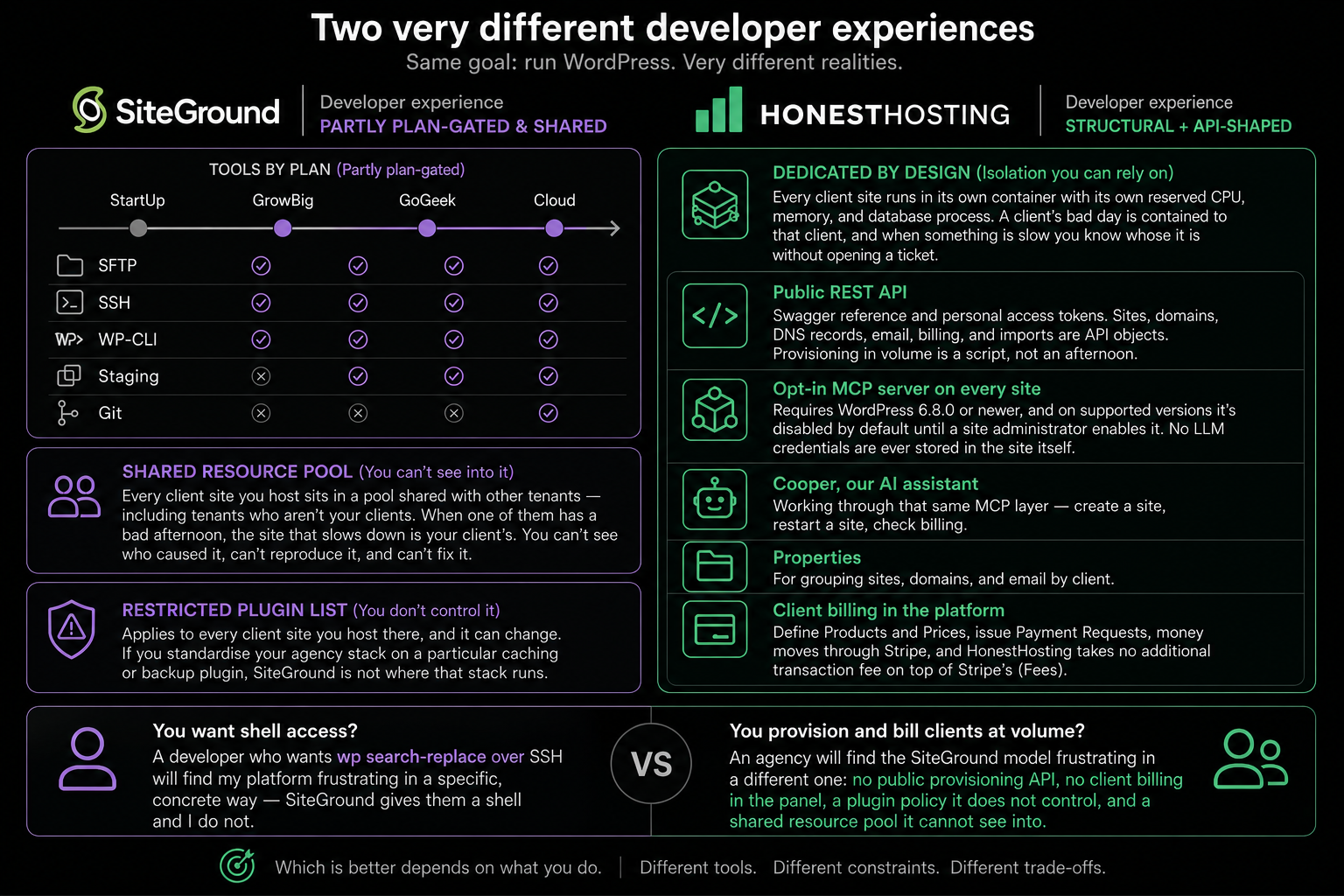
The SiteGround developer story is partly plan-gated. SFTP and SSH on every plan, with WP-CLI available; staging from the middle tier upward; Git only on the top tier. The tools exist and they are good, but which ones you get depends on which tier you bought.
The bigger constraint for an agency isn't the shell at all. Every client site you host sits in a pool shared with other tenants — including tenants who aren't your clients. When one of them has a bad afternoon, the site that slows down is your client's, the phone call is yours, and nothing in the dashboard tells you which neighbour caused it. You end up explaining a problem you can't see, can't reproduce, and can't fix.
Second to that is the restricted plugin list. It applies to every client site you host there, and it can change. If you standardise your agency stack on a particular caching or backup plugin, SiteGround is not where that stack runs.
On HonestHosting the first answer is structural. Every client site is its own container with its own reserved CPU, memory, and database process. A client's bad day is contained to that client, and when something is slow you know whose it is without opening a ticket. The second answer is tooling — no shell, but an API-shaped platform:
- A public REST API with a Swagger reference and personal access tokens. Sites, domains, DNS records, email, billing, and imports are API objects. Provisioning in volume is a script, not an afternoon.
- An opt-in MCP server on every site. Requires WordPress 6.8.0 or newer, and on supported versions it's disabled by default until a site administrator enables it. No LLM credentials are ever stored in the site itself.
- Cooper, our AI assistant, working through that same MCP layer — create a site, restart a site, check billing.
- Properties, for grouping sites, domains, and email by client.
- Client billing in the platform. Define Products and Prices, issue Payment Requests, money moves through Stripe, and HonestHosting takes no additional transaction fee on top of Stripe's (Fees).
Which is better depends on what you do. A developer who wants wp search-replace over SSH will find my platform frustrating in a specific, concrete way — SiteGround gives them a shell and I do not. An agency that provisions and bills client sites at volume will find the SiteGround model frustrating in a different one: no public provisioning API, no client billing in the panel, a plugin policy it does not control, and a shared resource pool it cannot see into.
Support
SiteGround runs 24/7 chat and ticket support with a reputation it has earned, staffed by people who know WordPress specifically rather than a generalist queue covering dozens of unrelated products. Phone support is available on the upper tiers. Their knowledge base is extensive and public — I have cited it here because it is the authoritative source for how their platform behaves.
This is the row where I am least able to claim an advantage on volume. SiteGround support is genuinely good, and at a scale I do not have. The trade-off is depth on the infrastructure itself: front-line support anywhere is working from documented behaviour, and the deepest questions still take escalation.
HonestHosting is small. Contact support and you're talking to the people who built the platform, often me. Nobody has to escalate a question about how the caching layer behaves, because the person who wrote it is reading your message.
That is also the limitation: no 24/7 phone room, and I am not going to claim one. If round-the-clock phone support is a hard requirement, SiteGround has an answer and I do not.
Pricing
SiteGround figures below are NOT yet verified — every number is marked and must be confirmed before publication. Both providers can change pricing.
SiteGround shared WordPress hosting
The SiteGround entry plan (StartUp) starts at a low introductory rate on a first term. I am not reprinting their full plan table here, for the same reason I do not reprint my own: a price transcribed into an article is a price that goes stale. What matters more than the entry figure is the renewal figure, which is materially higher — so read the current numbers from SiteGround own pricing page, and read them at checkout, where the renewal rate and term are shown in full.
Two things about SiteGround pricing that are documented and worth knowing regardless of the exact figures:
- The introductory rate applies to the first term only, and the renewal rate is substantially higher. This is the single most important line in this article. The discount is genuinely large, which means the step up at renewal is genuinely large too. Budget for the renewal number, not the sticker price — and if you prepay three years to hold the intro rate, understand you are prepaying to delay the increase, not to avoid it.
- There is a money-back window with specific edges. SiteGround offers a money-back guarantee on shared hosting plans within a limited window from purchase, but a registered domain is billed separately and is not refundable with the hosting, and renewals are treated differently from first purchases. None of that is unusual. It is just worth reading before you prepay a multi-year term SiteGround Terms of Service). None of that is unusual. It's just worth reading before you prepay a year.
HonestHosting
Sites are priced per site, per month, by tier. Storage — files, database, and backups combined — is metered per GB. CDN is a per-site add-on, managed DNS is priced per zone, and managed email is priced per mailbox.
I'm deliberately not reprinting the rates here, because a number transcribed into an article is a number that goes stale. Current pricing lives on one page, generated from the live billing catalogue.
No introductory rate, no renewal rate, no contract. You're billed monthly, in arrears — your card is charged on the 2nd for the previous month (Billing). Domain registration is quoted live from the registrar at search time rather than listed, because TLD pricing varies enormously and premium names vary more.
Comparing them honestly
One small business site, owner wants the cheapest simple option
SiteGround StartUp at its introductory rate, with email included in the same panel and well-regarded 24/7 chat support. With me the same services cost more at the outset, and support is weekday hours. SiteGround, comfortably — for the first term.
One WooCommerce store that matters
SiteGround GoGeek, with staging, Git, and more generous resource limits, versus Premium with me — 4 GB reserved for PHP and its own database container, plus storage and CDN. Depends whether you value the tooling and the tuned stack more, or the dedicated resources and the flat rate. Both are defensible.
An agency with 25 client sites
SiteGround means unlimited sites on one plan (a genuine cost advantage), but all of them sharing one account resource pool, the restricted plugin list applying to every one, no provisioning API, and separate client billing. With me it is per-site pricing, Properties, an API, and client billing in the panel. SiteGround is likely cheaper; the per-site premium here buys isolation and tooling. Whether that trade is worth it depends on how much of your week goes to provisioning, invoicing, and explaining slowdowns you cannot see into.
The claim I will make without qualification: my price does not change because your first term ended, and I will not remove a plugin from your site.
Migration
Moving a WordPress site off SiteGround does not require transferring your domain away, moving your mailboxes on day one, or taking the live site offline. You install the HonestHosting Site Migrator on the SiteGround site, paste an import key, run preflight, and start. SiteGround keeps serving traffic until you change DNS.
There is real SiteGround-specific cleanup: the sg-cachepress plugin (SG Optimizer) and the object-cache.php drop-in it installs for Memcached both need removing, since neither has anything to talk to once the site leaves SiteGround. If you were pushed onto SG Optimizer because your preferred caching plugin was disallowed, this is the point to reconsider that choice.
Who should choose which
Choose SiteGround
SiteGround is the right answer for a specific and very common customer: someone who wants a well-tuned WordPress host with genuinely good support, and who does not want to think about infrastructure at all.
- Your domain and DNS are already managed in Site Tools
- Your email is already hosted in the same panel
- You want 24/7 support with a strong reputation behind it
- You do not mind sharing platform resources, and noisy neighbours have not been a problem for you
Tick most of those and SiteGround is a well-run, well-supported home for that site. The restricted plugin list that frustrates a developer is invisible to someone who was never going to install W3 Total Cache in the first place — and SG Optimizer is, genuinely, a better-maintained caching setup than most people would configure themselves.
If that describes you and your site is running fine, do not move. Migrations cost time and carry risk even when they go well.
Choose HonestHosting
HonestHosting fits when control and isolation start mattering more than convenience. Usually that's one of these:
- The freelancer or agency running client sites, who wants each client isolated, sites grouped by Property, an API for provisioning, and client billing in the same platform.
- The person who hit the plugin restrictions — you have had a plugin disallowed on your own site, or built a workflow around caching or backup tooling SiteGround will not run.
- The operator of a site that has to hold up — a store, a membership site, a business's main lead source.
- The person tired of renewal-rate arithmetic, who would rather pay a consistent monthly amount for what they use than track when the introductory term expires.
If you want one vendor for everything, round-the-clock phone support, or the cheapest possible home for a single small site on a first term, I am not the right fit and I would rather say so now.
Frequently asked questions
Is HonestHosting a SiteGround alternative?
For some customers, yes — particularly agencies, resellers, and anyone who has run into the SiteGround plugin restrictions or wants guaranteed per-site resources rather than a share of an account pool. The genuine reasons to stay with SiteGround are the low first-term price, a caching stack maintained for you, staging and Git in the panel, and support with a track record — plus the plain fact that if a share of a well-tuned platform is fine for your site, you will not feel what isolation buys. I would tell you that rather than sell you something you do not need.
Can I move WordPress from SiteGround to HonestHosting?
Yes. Install the HonestHosting Site Migrator on your SiteGround site, paste in an import key, run preflight, and start the migration. It streams wp-content and your database in resumable chunks, then you remove SG Optimizer and the object-cache drop-in on the other side. Full walkthrough in the SiteGround migration guide.
Do I have to move my domain away from SiteGround?
No. Domain registration, DNS hosting, and web hosting are three separate services. You can leave the domain registered with SiteGround indefinitely, keep their DNS, and change only the records that point at the web server. You can also go the other way once the site has settled — bring the domain and DNS here too, so hosting, domains, DNS, and email arrive on one monthly invoice and the costs are easier to track. Either way it is a separate decision from the migration itself, and doing them one at a time is what keeps a simple move simple.
Will my email keep working?
Yes, provided you do not touch your MX records. Email follows MX, not your website. If your mailboxes are hosted in Site Tools you can leave them there while the site moves, then migrate mail as a separate step. Change the A and CNAME records for the web server and leave MX, SPF, DKIM, and DMARC alone, and nothing happens to your mail.
Does HonestHosting restrict any plugins?
No blanket blocklist. Each site runs in its own container against its own resource allocation, so what you install affects your site and nothing else. We do reserve the right to remove a plugin that turns out to be actively malicious, or that is harming the platform for other customers — but that's a response to a specific problem, not a standing list. The corollary is that nothing stops you installing three conflicting caching plugins, either (but it's still not the best idea!).
Will my website go down during the migration?
Not during the copy — your SiteGround site stays live throughout. The only change visitors could notice is the DNS cutover, and with a lowered TTL both copies serve correctly during propagation.
Do you offer staging like SiteGround does?
Not today. SiteGround has one-click staging on its middle and upper tiers and we do not have an equivalent yet. It is planned, and being designed to handle the parts that actually cause problems rather than just cloning a site — if it is a hard requirement for you now, ask about early access.
What happens if my site outgrows its tier?
Change the tier on the site and save; the platform redeploys with the new allocation. No re-platforming, no sales call.
References
SiteGround (primary sources — NOT yet verified, confirm before publishing)
- SiteGround KB — restricted plugins
- SiteGround — WordPress Hosting plans
- SiteGround KB — security and SiteScanner
- SiteGround Knowledge Base (hub)
- SiteGround — Terms of Service
- SiteGround — WordPress Hosting product page
HonestHosting
- Pricing
- Docs — Create a site, Edit, Import
- Docs — Billing and Fees
- Docs — Glossary: Sidekick, CDN Invalidation, Custom DNS, FileManager
- API reference (Swagger)
- caddy-sidekick on GitHub
Try HonestHosting
If per-site isolation and no plugin restrictions are what you're after, create one site and put something real on it. No contract, no introductory rate to time — billed monthly for what you use.